DDoS-Protected Web Hosting (2026): What Each Host's Protection Covers
Most "DDoS-protected" web hosting protects the network, not your application. Hosts commonly list DDoS protection on their plans, but they rarely say which kind, and the difference decides whether your site stays up. Floods of raw traffic (network layers 3 and 4) are what large networks absorb well. Floods of fake page requests (layer 7) need a firewall that reads each request. The cheapest reliable way to get both is to put the site behind Cloudflare: its documentation says unmetered DDoS protection covering layers 3, 4 and 7 is included on every plan, the free one too.
This guide is for site owners comparing hosts on security, and for anyone who has been hit once and wants to know what their plan actually covers. If you run a small blog or business site that has never been targeted, the answer is usually simple: a host with a web application firewall plus Cloudflare's free plan. We recommend Cloudflare here because it works, and it pays us nothing.
Do web hosts include DDoS protection?
Many say they do, and most stop short of saying what it covers. HostGator's plan lists include "DDoS Protection Included" and a "DDOS Scrub Center". Bluehost lists WAF and DDoS protection on its Business and eCommerce Essentials shared plans, while its WordPress page lists them on all three plans, so its own pages disagree. Hostinger offers "enhanced DDoS protection" with its Business and Cloud Startup plans. SiteGround says its AI anti-bot system blocks brute-force attempts and proactively prevents DDoS. Liquid Web's VPS plan cards list "DDoS protection" as included.
What none of these statements give you is a layer, a capacity or a response promise. That is not proof the protection is weak; it means you cannot compare it from the plan card. The useful questions to put to any host are which layer it filters, whether a firewall inspects web requests on your plan, and what it does if your account is the target: filter the attack, or switch the account off to protect its other customers.
Network vs application attacks, explained
A distributed denial-of-service (DDoS) attack tries to make a site unreachable by sending more traffic than it can handle, from many machines at once, so there is no single source to block. The two families need different defences. A network flood (layers 3 and 4) fills the connection with packets; it is stopped by capacity and scrubbing upstream of the server. An application flood (layer 7) sends requests that look like real visitors loading pages, each one making the server do work; it is stopped by inspecting requests, limiting rates and filtering bots.
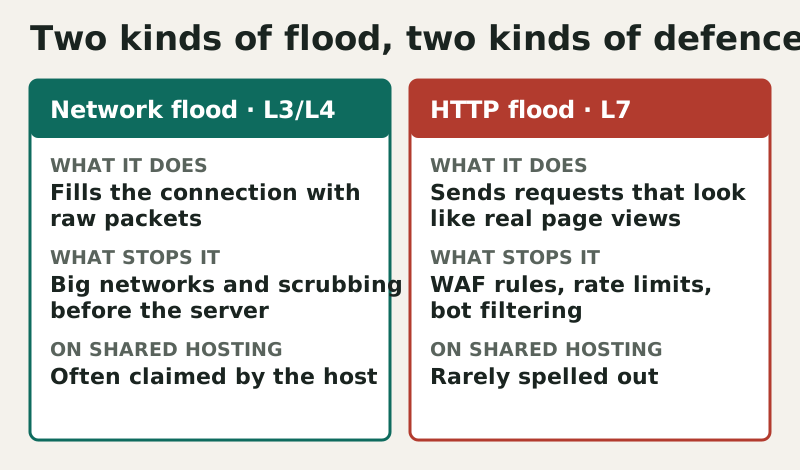
On shared hosting the layer-7 case is the awkward one. A modest application flood aimed at a heavy page can use up a shared account's CPU limit long before it troubles the host's network. The host's network-level protection may never notice, while your site returns errors. That is why a web application firewall, and an edge network in front of the host, matter more for most small sites than a big headline capacity figure.
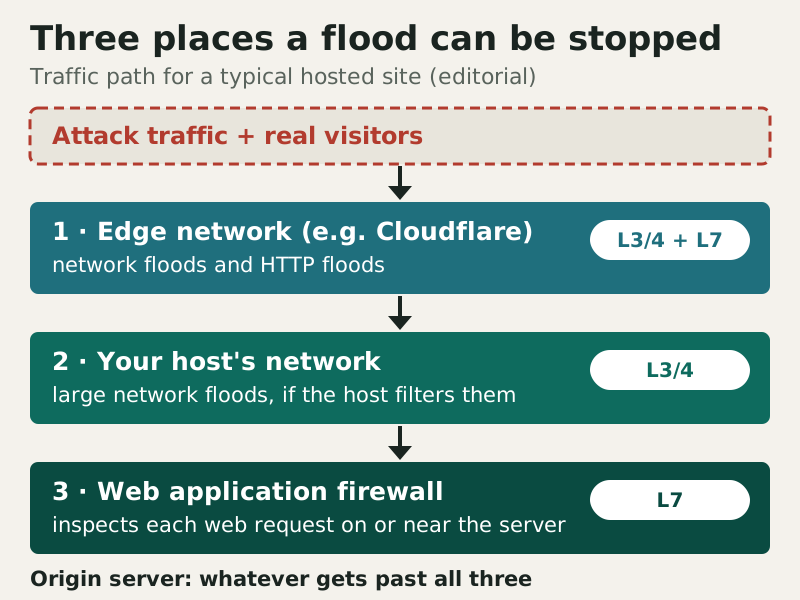
What each host says it covers
We read each host's own plan, pricing and security pages on 9 and 10 October 2026. The table quotes what the host says and the plans it applies to. Where a host does not name a layer, we leave the column at "not stated" rather than infer one.
| Provider | What the host says | Layer named? | Request firewall (WAF) | Plans |
|---|---|---|---|---|
| Cloudflare (in front of any host) | Unmetered DDoS protection | Yes: L3/4 and L7 | Free Managed Ruleset; full rules on Pro and up | All plans, Free included |
| SiteGround | AI anti-bot that proactively prevents DDoS | Not stated | In-house WAF | All plans |
| Hostinger | Enhanced DDoS protection | Not stated | WAF on managed WordPress plans | Business and Cloud Startup |
| Bluehost | DDoS protection included | Not stated | WAF listed | Business, eCommerce Essentials (WordPress page: all) |
| HostGator | DDoS Protection Included; DDoS Scrub Center | Not stated | Not stated | Shared plan feature lists |
| ChemiCloud | Firewall against brute force, DoS and port scans | Not stated | Imunify360 WAF | Shared plans |
| Cloudways | Server firewall (Imunify360) protects against DoS attacks | Not stated | Not stated; Cloudflare Enterprise add-on from $4.99 per domain a month | Managed cloud servers |
| Liquid Web | DDoS protection | Not stated | Not stated | VPS plan cards |
Read across the "layer" column and the pattern is plain: only Cloudflare documents which attacks it covers. ChemiCloud and Cloudways are careful with their wording and talk about DoS, not DDoS, alongside Imunify360 firewalls. For a host-side request firewall on shared plans, SiteGround's in-house WAF and ChemiCloud's Imunify360 are the clearest statements in the table. If you need a server of your own with DDoS protection listed on the plan, Liquid Web's VPS range starts at $5 a month for a 1 GB Cloud VPS (read 9 October 2026).
How to read a host's DDoS claim
Because plan cards say so little, the useful information comes from asking. Support teams at reputable hosts will answer these questions in writing, and the answers tell you more than any badge. Save the replies with your account records; they are the closest thing to a service promise you will get on shared hosting.
- Which layers do you filter? Network floods only, or HTTP floods as well?
- Is a web application firewall active on my plan, and can I see or adjust its rules?
- What happens to my account during a large attack? Filtered, rate-limited or taken offline?
- Can I put Cloudflare or another proxy in front of the site, and restrict the server to its addresses?
- Is any of this an add-on, and what does it cost at renewal?
The third question matters most. On shared infrastructure, a host has to protect every customer on the server, and some providers handle a large attack by taking the targeted site or address offline until it passes. That keeps the neighbours up and leaves you down. A host that can describe how it filters an attack against one account, instead of isolating it, is offering something more valuable than one that only says "protected".
Adding Cloudflare: free vs paid tiers
Cloudflare sits in front of your host as a reverse proxy, so attack traffic meets its network before it reaches your server. Its documentation states that unmetered DDoS protection, covering layers 3, 4 and 7, comes with every plan, Free included; unmetered means you are not billed more for being attacked. The paid tiers change the firewall rather than the DDoS cover. Free includes only the Cloudflare Free Managed Ruleset, while the full Cloudflare Managed Ruleset and the OWASP Core Ruleset need Pro or above.
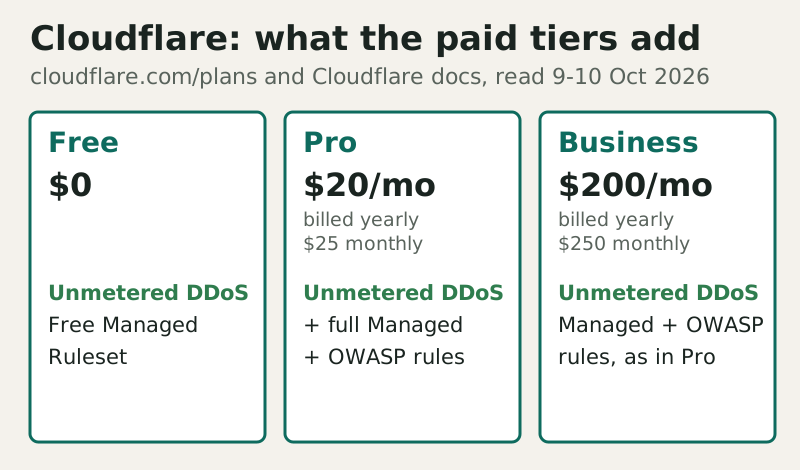
For most small sites, Free is the right start: it moves the DDoS problem onto a network built for it, at no cost. Pro, at $20 a month on annual billing or $25 monthly, is worth it when you need the fuller managed rules, for example on a WordPress shop that attracts exploit scans. Business, at $200 a month billed annually, is a decision for sites where downtime costs real money. Organisations working on human rights, civil society, journalism or democracy can apply to Cloudflare's Project Galileo, which gives free Business-level protection to eligible groups, usually through partner organisations.
The setup has one rule that undoes everything if ignored: keep your origin server's address private. Point DNS at Cloudflare, and do not leak the server's IP through old DNS records, mail headers or a subdomain that bypasses the proxy. Where your host allows it, accept web traffic only from Cloudflare's addresses.
When you need specialised protection
Some sites outgrow "included" protection. A shop that has been attacked before, a site handling sensitive accounts, or a game or community server that attracts grudges should plan for layer-7 attacks specifically: rate limits on login and search, bot rules, and a paid firewall tier or a managed host that will respond to an incident rather than suspend the account. Queries for "offshore DDoS protection" often come from site owners who expect an overseas host to shield them; jurisdiction does nothing for traffic floods, and a well-configured edge network does more than a change of country.
When an attack is under way, act in this order: switch on your edge provider's emergency mode if you have one, contact your host so it knows the traffic is hostile, and do not pay an extortion demand. Afterwards, check whether the origin IP leaked and rotate it if it did. Our hosting hardening checklist and the shared hosting security risks guide cover the rest of the defensive set-up.
Edge cases
Metered cloud bills. On usage-billed cloud servers, an attack that triggers autoscaling can raise your bill even if the site survives; unmetered edge protection limits that exposure. Email and other services. A proxy in front of the website does not hide a mail server on the same IP, so keep mail on a separate address or provider. Shared neighbours. On shared hosting, an attack on another customer can slow your site too; account isolation helps with resource limits, not with bandwidth. Self-inflicted floods. Aggressive crawlers and badly written plugins can look like an attack in your logs, so check before you block. For the wider picture of how hosts compare on security, see our secure web hosting ranking.
DDoS protection questions, answered
Does my web host protect me from DDoS attacks?
Is Cloudflare's free plan enough for DDoS protection?
What is the difference between DDoS protection and a WAF?
Does offshore hosting give better DDoS protection?
Can attackers bypass Cloudflare and hit my server directly?
Ready to choose a host? See the most secure web hosting, ranked, or run the web hosting security checklist.