Hosting Backups Explained: Frequency, Retention and Restores by Host (2026)
Yes, most web hosts back up your site automatically, but how often, for how long and on what terms varies more than the plan pages admit. SiteGround keeps daily backups for 30 days in a different data centre; Hosting.com keeps daily, off-server copies for 30 days; Bluehost's and HostGator's entry plans list weekly backups, and both reserve the right to charge for a restore. Almost every host's terms also say the same thing in legal language: backups are ultimately your responsibility. So use the host's backup for quick rollbacks, and keep one copy of your own somewhere the host cannot reach.
This page compares what each host actually publishes, as read on 9 and 10 October 2026, and shows how to build a backup setup that survives the incidents a host backup cannot. If you only want the short version: pick a host with daily backups and at least 14 days of history, check whether restores are free, and add an off-host copy. Our secure web hosting ranking weighs backups alongside the other security controls.
Do web hosts back up your site? Yes, with a catch
Every host in our comparison runs some automatic backup, and the better ones let you restore it yourself in a couple of clicks. The catch sits in the terms of service. Bluehost's terms make backups the customer's duty and say no backups are attempted for accounts over 50,000 files or 30 GB. HostGator's terms describe its backups as a courtesy and remove shared accounts over 20 GB from off-site backup, databases excepted. GreenGeeks' terms say it keeps a copy for 24 hours for disaster recovery and that customers must keep their own archives. ChemiCloud's terms call its nightly backups administrative, not guaranteed.
None of that makes host backups useless. It means they are a service the host runs for its own recovery and offers to you as a convenience, not an insurance policy with your name on it. Knowing the limits in advance is what lets you rely on the parts that work.
Backup policies compared
The table lists what each host publishes for its shared or entry plans: how often it backs up, how much history it keeps, where the copies live and what a restore costs. Where a host does not publish a figure, we say so rather than estimate it. All entries come from the host's own plan pages, FAQ or terms, read on 9 and 10 October 2026.
| Host | Frequency | Retention | Where copies live | Restores and limits |
|---|---|---|---|---|
| SiteGround | Daily, all plans | 30 days | A different data centre | Self-service; on-demand backups GrowBig and up; no restore fee stated |
| Hosting.com | Daily | 30 days | Off-server | Complimentary up to 50 GB in total |
| FastComet | Daily | Up to 30 copies | Off-site | Restore Manager included; terms put backups on you |
| ChemiCloud | Daily | 10 / 20 / 30 days by plan | Off-site | Self-service JetBackup free; staff-made cPanel backup is paid |
| GreenGeeks | Daily, all plans | Not published | Not stated | On-demand on select plans; terms: 24-hour DR copy |
| DreamHost | Daily | Not published | Not stated | On-demand on its WordPress features page |
| Hostinger | Weekly (Single, Premium); daily (Unlimited, Cloud) | Two weekly copies, plus last week's dailies | Not stated | Terms make the customer solely responsible |
| Bluehost | Weekly (plan cards) | Not published | Not stated | Restore fee reserved; none over 50,000 files or 30 GB |
| HostGator | Weekly courtesy | Not published | Off-site, under 20 GB | Restore fee reserved, amount not stated |
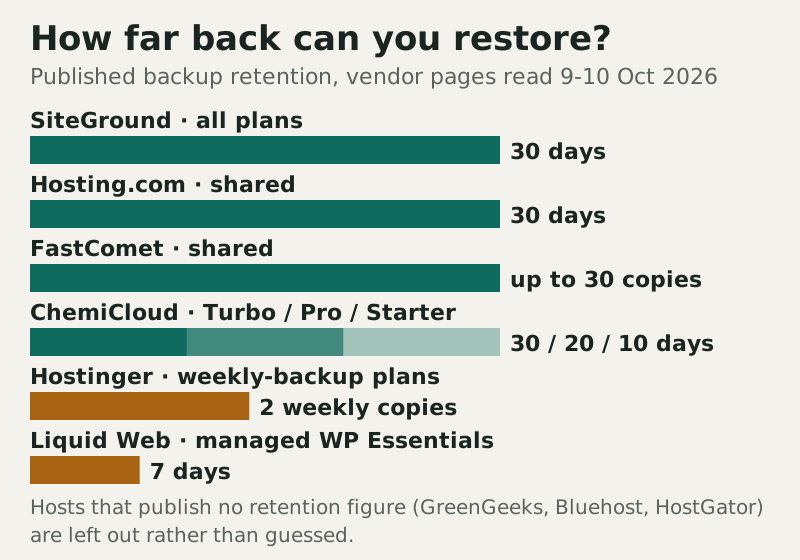
The split is clear. A group of hosts (SiteGround, Hosting.com, FastComet and ChemiCloud's top plan) publish daily backups with 30 days of history and say the copies leave the server. The big Newfold brands, Bluehost and HostGator, list weekly backups on their entry plans and keep the option to bill for restores. Hostinger sits in between: its two cheapest plans back up weekly and keep two weeks, while Unlimited and Cloud plans back up daily. If you need daily backups with long history on a shared budget, SiteGround and ChemiCloud's Turbo plan are the clearest on paper.
Why retention matters more than frequency
Frequency decides how much recent work you lose; retention decides whether a clean copy still exists. A site infected with malware that goes unnoticed for ten days is not saved by daily backups kept for seven: every copy already contains the infection. That is why the history column matters as much as the word "daily". ChemiCloud's own tiers show the trade clearly, at 10 days on Starter, 20 on Pro and 30 on Turbo. Managed hosts vary in the same way: Liquid Web's managed WordPress plans keep 7, 14 or 30 days depending on tier, Kinsta keeps 14 to 30 days depending on plan, and WP Engine states 30 to 60 days.
For a small brochure site, two weeks of history is usually workable. For a shop, a membership site or anything you edit every day, aim for 30 days and frequent backups, because both lost orders and slow-burn infections become more likely. If you are weighing the security side of that choice, our guide to what makes web hosting secure covers the controls that stop an infection reaching your backups in the first place.
What makes a hosting backup secure
A secure hosting backup is one an attacker, a billing problem or a server failure cannot take out together with the site. In practice that means four properties. It is stored away from the server it protects, which is why "different data centre" and "off-site" in the table are worth more than a bigger number of copies. It is separated by access, so the password that opens your control panel cannot also delete every backup. It is kept long enough to reach back past a slow infection. And it is private, because a backup holds the whole database, customer details included. Host backups usually deliver the first and third; your own copy is how you get the second and the fourth under your control.
Restore fees and tier gates
The cost of a restore rarely appears on a plan card. Bluehost and HostGator both reserve a restoration fee in their terms without naming an amount. ChemiCloud's self-service JetBackup restores are free, but a cPanel backup generated by its staff carries a fee. SiteGround does not state a restore fee for its daily backups, though on-demand backups need GrowBig or GoGeek. Hostinger keeps daily backups for its Unlimited and Cloud plans, leaving Single and Premium on weekly copies.
Paid backup upgrades are where the bill grows. Kinsta sells 6-hourly backups at $20 a month per site and hourly backups at $100 a month per site. Cloudways charges $0.033 per GB for off-site backup storage on each server. DigitalOcean prices Droplet backups at 20% of the Droplet's cost for weekly copies or 30% for daily. None of these is unreasonable, but they belong in the price you compare, alongside the renewal rate.
The 3-2-1 rule for a hosted site
The 3-2-1 rule asks for three copies of your data, on two kinds of storage, with one copy somewhere else. For a website that translates neatly. The live site is copy one. The host's automatic backup is copy two, ideally kept in a separate data centre, as SiteGround and Hosting.com describe. Copy three is yours: a scheduled export to cloud storage or a drive you control, outside your hosting account.
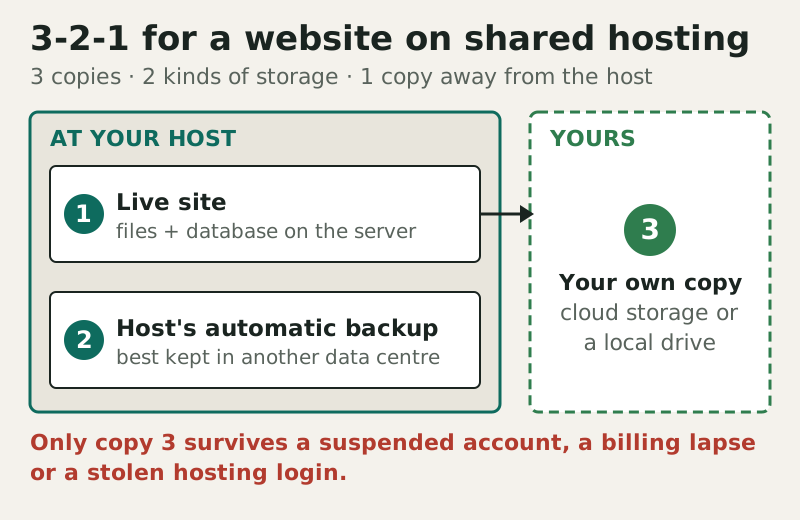
Copy three is the one that matters in the incidents a host backup cannot cover: an account suspended for a billing problem, a hosting login taken over by an attacker who deletes backups as well as files, or a host-side outage. The US Cybersecurity and Infrastructure Security Agency's Cyber Essentials guide for small businesses makes the same point in general terms, asking for automatic backups that are protected and include offline copies. For WordPress, a backup plugin that ships copies to external storage on a schedule does the job without you remembering anything.
Testing a restore
A backup you have never restored is an assumption. Test one when nothing is wrong, so the first restore is not during an emergency. The steps below take under an hour on most hosts and prove the whole chain.
- Create a staging copy or a subdomain, so you never test over the live site.
- Restore both the files and the database from the same date; a mismatched pair can break a site in odd ways.
- Load the restored copy, log in and check recent content, forms and, for a shop, the latest orders.
- Note how long it took and whether support had to help. That is your real recovery time.
- Repeat the test with your own off-host copy, which is the one you will need in the worst case.
Two habits finish the job. Protect your own backups like the live database, because they contain the same customer data, so store them with access controls and preferably encrypted. And check your retention against how quickly you would notice a problem; our hosting hardening checklist includes the monitoring that shortens that gap. If a restore ever becomes urgent because of an intrusion, read how hosts and sites get hacked before you restore, so the same hole is not reopened.
Edge cases
Large accounts. Size limits quietly switch backups off: Bluehost skips accounts over 50,000 files or 30 GB, HostGator drops shared accounts over 20 GB from off-site backup, and Hosting.com's free backups cover 50 GB in total. If your site is media-heavy, check where you sit. Email. Hosting backups usually cover website files and databases; check separately how your mailboxes are backed up. Plan changes. On Hostinger, moving from Premium to Unlimited changes weekly backups to daily, which is a real security upgrade, not just more storage. Moving hosts. Download a full backup before you cancel. Do not count on reaching the old host's backups once the account is closed, and the new host cannot restore what it never had. For a host that publishes daily, 30-day, off-server backups on shared plans, Hosting.com (formerly A2 Hosting) and FastComet are also worth a look.
Hosting backup questions, answered
Does web hosting include backups?
Which web hosts have daily backups?
How long do hosting companies keep backups?
Do hosts charge to restore a backup?
Is my host's backup enough on its own?
Ready to choose a host? See the most secure web hosting, ranked, or run the web hosting security checklist.