Website Hacked? What Your Host Will Do, What It Won't, and the First Hour
If your website has been hacked, start by copying the site as it is, then change every password from a device you trust, then call your host. In that first hour, avoid deleting files or restoring a backup until you know how the attacker got in. Restoring too early often brings the same hole back. Most hosts will scan your account and may quarantine infected files, but few clean a hacked site for free: GreenGeeks offers one complimentary WordPress cleanup, ChemiCloud includes a malware scanner that fixes threats on its Turbo plan, and SiteGround, Hostinger and others route manual cleanup through a paid service.
This guide is for site owners in the middle of an incident or worried about one. It covers what to do right now, what each host's published policy says it will do, what paid cleanup costs, and how to stop a repeat. It is not a forensic manual. If customer payment data or personal data may have been exposed, you may also have legal duties to report, and those deserve professional advice.
First hour: what to do right now
Speed matters, but order matters more. The steps below follow the logic of the US Cybersecurity and Infrastructure Security Agency's Cyber Essentials guide and the UK National Cyber Security Centre's Small Business Guide, which points hacked businesses to its Response and Recover guidance. Both put a plan and protected backups at the centre of recovery.
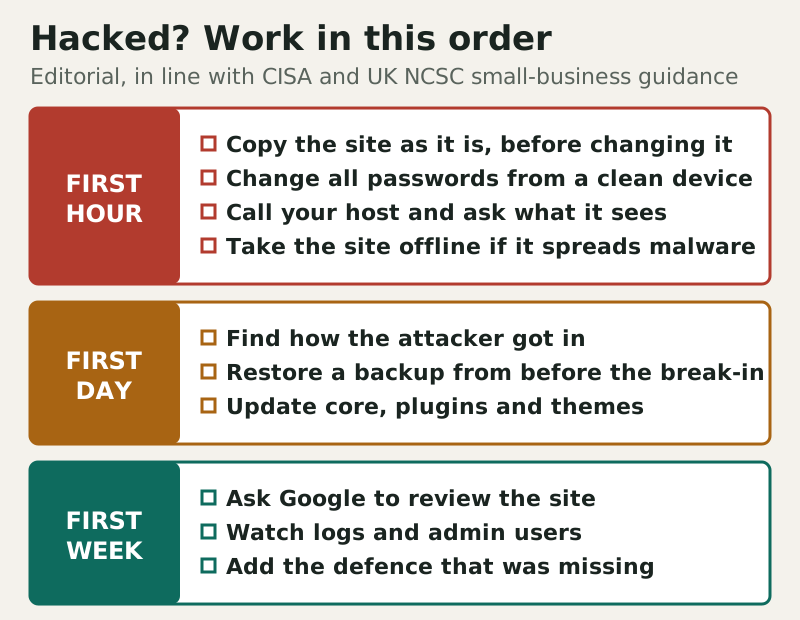
- Copy the site as it is. Download the files and the database before you change anything. The copy is evidence, and it lets you recover content an attacker did not touch.
- Change every password from a clean device: hosting account, control panel, CMS administrators, SFTP or FTP, database users and the email account tied to the hosting login. Turn on two-factor sign-in wherever it exists.
- Call or chat with your host. Ask what its systems have seen, whether your account is suspended or quarantined, and what cleanup options your plan includes.
- Take the site offline if it is harming visitors, for example by redirecting them or serving malicious downloads. A maintenance page is better than spreading an infection.
While you wait for support, check whether Google has flagged the site. Search Console's Security Issues report shows whether Google has detected hacked content, and it is where you later request a review once the site is clean. If you do not have Search Console set up yet, adding it now gives you that report for the recovery.
Signs your site has been hacked
Not every problem is a hack, so confirm before you start changing things. The common signs are visible ones: visitors redirected to unrelated sites, pop-ups or adverts you did not add, a browser or search warning on your pages, or a host email saying your account has been quarantined for malware. Others are quieter. Search results for your domain may show spam titles in languages you do not publish in, new administrator accounts may appear in the CMS, files may change in folders you never touch, and your outgoing email may start bouncing because the server has been sending spam. If you see any of these, assume compromise and follow the first-hour order above; if you see none and the site is just slow or broken after an update, a rollback is probably the faster fix.
What hosts do when a site is hacked
A host's job in an incident is mostly to protect its own platform and its other customers, so the default response is detection and containment: scanning, quarantining infected files and sometimes suspending the account. Cleanup is a separate service with its own price on most hosts. The table summarises what each host publishes, as read on 9 and 10 October 2026.
| Host | Included on the plan | Cleanup route | Catch |
|---|---|---|---|
| GreenGeeks | AI firewall and network DDoS mitigation | One complimentary cleanup | WordPress only, one cPanel account, no guarantee |
| ChemiCloud | Imunify360 auto-scan and quarantine (all plans) | Scan-and-fix included on Turbo | Terms describe no cleanup service |
| SiteGround | Site Scanner, free on every plan | Expert Care (paid) | Price not published on the page we read |
| Hosting.com | Malware detection and removal (shared) | Included per plan list | Scope not detailed |
| Bluehost | Malware Scan & Clean on Starter; AI Malware Defense on Business and up | Human cleanup in paid Complete Security ($5.99/mo for 12 months, renews $19.99/mo) | Restore fee reserved in its terms |
| HostGator | Malware scanning; AI-powered detection and removal listed | SiteLock add-on | SiteLock price not published; non-refundable |
| Hostinger | WAF and malware scanner on WordPress plans | Website Cleanup (paid) | Non-refundable |
| FastComet | Malware scanner on all plans | Not stated | Cleanup not described |
The useful split is between hosts that detect and hosts that repair. Almost everyone scans; only a few say they will remove what they find without a separate purchase, and even then with limits. GreenGeeks' free cleanup is genuinely useful for a single WordPress site, but its terms make it a one-off with no guarantee. ChemiCloud's Turbo plan is the clearest "scan and fix" promise on shared hosting. If you are choosing a host partly for this, ChemiCloud and GreenGeeks state their terms most plainly, and SiteGround pairs its free scanner with a paid expert route.
Ask your host one more thing during the incident: will it restore a backup for you, and at what cost? Bluehost and HostGator reserve a restoration fee in their terms without naming the amount, so it is worth asking before support starts the job.
Paid cleanup services: what they cost
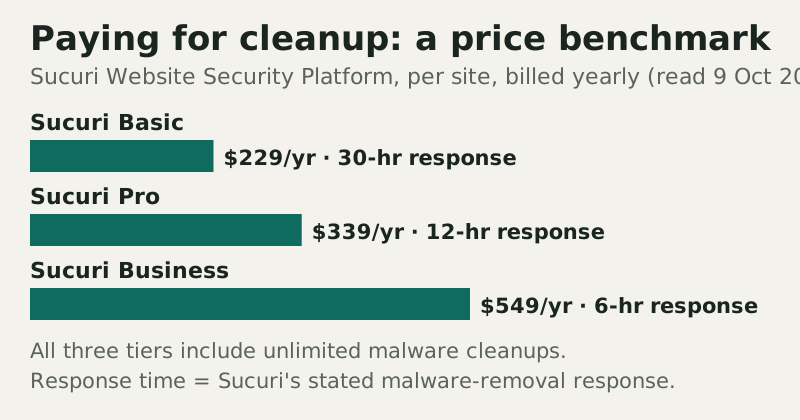
If your host does not clean sites, or you want someone accountable for the result, a specialist cleanup service is the next step. Sucuri publishes its prices, which makes it a useful benchmark. Its Website Security Platform costs $229 a year per site on Basic, with a 30-hour malware-removal response; $339 on Pro, with 12 hours; and $549 on Business, with 6 hours. All three include unlimited malware cleanups.
Host-sold security products are harder to compare because their prices are often shown only at checkout. HostGator names SiteLock as a non-refundable add-on without publishing its price; bought directly from SiteLock, plans started at $19.99 a month billed monthly on 10 October 2026, with manual expert cleanup sold separately. Bluehost puts human cleanup in its paid Complete Security plan, $5.99 a month on a 12-month term and renewing at $19.99 a month (read 10 October 2026). GoDaddy's refund policy says its Website Security product is refundable within 30 days only if a manual malware removal has not been completed. That last clause is a sensible rule, but it means buying cleanup in a panic is a firm commitment.
Restoring from backup safely
A restore is the fastest clean-up when the backup predates the break-in, and the most dangerous one when it does not. Before you restore, work out roughly when the compromise began: the earliest suspicious file change, the first unknown admin user, or the date Google first flagged the site. Then choose a backup from before that point, and restore files and database together.
This is where retention decides the outcome. A host that keeps 30 days of daily backups gives you far more room than one that keeps two weekly copies; our comparison of hosting backups by host lists who keeps what. After the restore, update the CMS, plugins and themes immediately, change the passwords again, and remove any user accounts you do not recognise. Restoring without fixing the entry point simply resets the clock for the attacker.
Hardening so it doesn't recur
Most website compromises start on the customer's side of the shared-responsibility line: an outdated plugin, a reused password, an abandoned admin account. Our explainer on how sites and hosts get hacked covers the common routes. Once the site is clean, close the one that was used, then work through the rest.
- Keep the CMS, plugins and themes updated, and delete the ones you do not use.
- Use unique passwords and two-factor sign-in for every account that can change the site.
- Put a web application firewall in front of the site: your host's, or Cloudflare's free plan.
- Keep an off-host backup with enough history to reach back past a slow infection.
- Review admin users and file changes on a schedule rather than after an incident.
The fuller version is our web hosting security checklist, and the hosting hardening checklist goes deeper on server-side settings. If a host suspended your account during the incident, ask what it needs to see before reinstatement, and keep the reply. When the site is clean and hardened, request the review in Search Console and keep watching the Security Issues report for the following weeks. If the incident has you weighing a move, our secure web hosting comparison sets out what each host includes before you sign up again.
Edge cases
Your host was the one breached. Large hosts can be compromised too, and some have disclosed breaches of their own systems; in that case, follow the host's notices, change every credential and rely on your off-host backup. Your account is suspended. You may lose access to the control panel and on-host backups at once, which is exactly why a copy outside the host matters. The site handles payments or personal data. You may have notification duties; speak to your payment provider and take advice. You keep getting reinfected. That usually means a backdoor survived or a credential is still known to the attacker; a professional cleanup is cheaper than a third round. You only see spam in search results. Some hacks hide content from visitors and show it only to search engines, so check Search Console, not just the homepage.
Hacked website questions, answered
My website has been hacked. What should I do first?
Will my web host clean up a hacked website for free?
How much does hacked website recovery cost?
Should I restore my website from a backup after a hack?
How do I secure my web hosting account after a hack?
Ready to choose a host? See the most secure web hosting, ranked, or run the web hosting security checklist.